

Heartspace
Ontwikkelaars.
Build on our API and bring dating into your own product.
Our API allows you to retrieve information from our website via GET requests and supports the following query parameters:
| Name | Meaning | Values | Description | Required |
|---|---|---|---|---|
| type | Query type. | get_user_data, posts_data | This parameter specifies the type of query. | |
| limit | Limit of items. | LIMIT | This parameter specifies the item limit. Maximum: 100 | Default: 20 |
How to start?
- Create a development application.
- Once you have created the app, you'll get APP_ID, and APP_SECRET.
Example: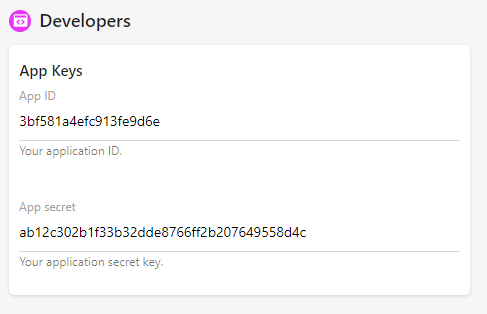
- To start the Oauth process, use the link https://loyal-blue-canary.64-20-37-43.cpanel.site/oauth?app_id={YOUR_APP_ID}
- Once the end user clicks this link, he/she will be redirected to the authorization page.
- Once the end user authorizes the app, they will be redirected to your domain with a GET parameter "code", for example: http://yourdomain/?code=XXX
- In your code, to retrieve the authorized user info, you need to generate an access code, please use the code below:
PHP:<?php $app_id = 'YOUR_APP_ID'; // your application app id $app_secret = 'YOUR_APP_SECRET'; your application app secret $code = $_GET['code']; // the GET parameter you got in the callback: http://yourdomain/?code=XXX $get = file_get_contents("https://loyal-blue-canary.64-20-37-43.cpanel.site/authorize?app_id={$app_id}&app_secret={$app_secret}&code={$code}"); Respond: { "id": "1", "verified_final": true, "fullname": "admin", "country_txt": "Algeria", "age": 0, "profile_completion": 57, "profile_completion_missing": [ "first_name", "last_name", "facebook", "google", "twitter", "linkedin", "instagram", "phone_number", "interest", "pets", "live_with", "car", "religion", "smoke", "drink", "travel" ] } ?>